Embedded Financial AI Assistant
CloudSell
Copilot —
Natural-Language Accounting Intelligence
An AI assistant embedded directly inside CloudSellPOS — the accounting and ERP platform used by SMEs across the region — that lets any user ask financial and operational questions in plain Arabic or English and get an instant, data-backed answer, without hunting through reports, filters, and menus.
01 — Overview
Executive Summary
CloudSell Copilot is an AI assistant built directly into CloudSellPOS, a comprehensive accounting and business-management platform used by SMEs. It lets any user ask financial and operational questions in their own natural language — Arabic first — and receive the answer immediately: an account balance, sales for a given period, invoice or voucher details, stock quantity at a specific warehouse, a sales rep's performance report, or even "how do I do X in the system?"
The core distinction from a generic chat assistant is architectural: every financial answer Copilot returns is grounded in real data pulled live from the tenant's own database at the moment of the question — not generated text. And every query passes through the exact same permission layer as the rest of the system, so anything a user cannot see in a standard report, Copilot will not surface either.
The result: the gap between "I have a question" and "I have the answer" collapses into a single conversation — without giving up an inch of data accuracy or access control for the sake of speed.
The Problem
The Challenge
- Comprehensive accounting/POS systems accumulate dozens of specialized screens and reports — sales, account statements, inventory, financial reports, rep logs — necessary breadth, but a real daily burden
- Reaching one simple figure ("what were a rep's sales last month?") means knowing exactly which report holds it, opening it, then setting the right filters
- New users face a real learning curve just locating where each piece of information lives in the system's structure
- Users think in everyday language, not in the technical vocabulary of menus and report names
The Solution
- A conversational layer sitting on top of the existing CloudSellPOS architecture — not a replacement system
- Understands question intent, executes the real query against the same data the standard reports use
- Returns the answer in natural language inside one chat window, with a direct link to the full report when needed
- Disambiguates automatically instead of guessing when a name or item could match more than one record
- Retains short-term conversation context so follow-up questions don't need to restate everything
02 — Architecture
From Question to Answer
A conversation layer that understands intent, executes a real query, and respects every permission boundary already in place.
Language Ask
Understanding
Financial Action
the Core System
Tenant Data
+ Report Link
Semantic Intent Understanding
Semantic SearchCopilot recognizes intent through semantic similarity rather than keyword matching — so "what's the balance of...", "I need the balance for...", and "how much does ... owe" are all understood as the same underlying question, regardless of phrasing or dialect.
Precise Financial Action Selection
Tool CallingBehind every question type sits a dedicated action that runs against real data — never guessed text. The model itself selects the correct action via tool calling, a far more reliable mechanism than simple text-pattern matching.
Permission-Aware Execution
Access ControlEvery query executes under the identity of the actual requesting user, filtered by the exact same module- and record-level permission rules enforced everywhere else in CloudSellPOS. Copilot holds no elevated access of its own.
System-Grounded General Knowledge
Knowledge BaseFor non-financial questions ("how do I add an invoice?"), Copilot draws on a knowledge base built from CloudSellPOS's actual documentation — not generic public knowledge that might not match the product's real behavior.
03 — In Action
One Conversation,
Full Reporting Depth
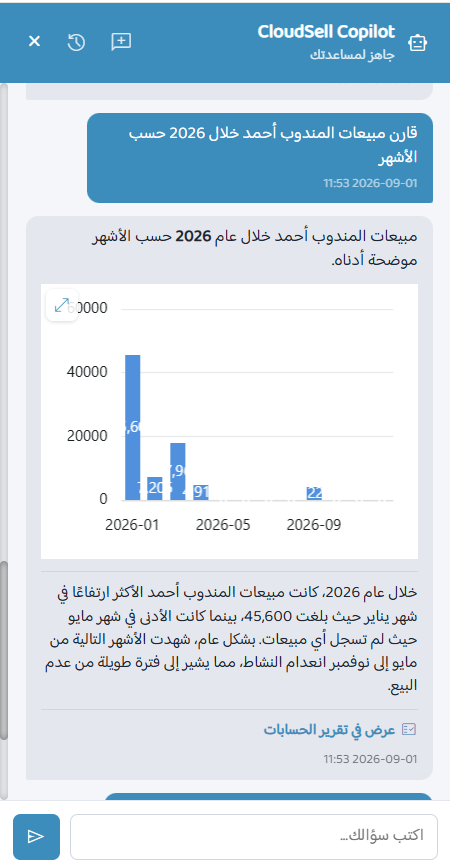
A user opens Copilot from anywhere in the system via a persistent icon in the top bar, asks a question the way they would ask a colleague, and gets a direct answer — including, when relevant, a rendered chart built from the live query result and a link straight into the full report for anyone who needs to drill down or print.
- Ask in everyday language — no need to know report names or menu paths
- Automatic disambiguation — matching accounts or items are presented as one-click options instead of a guess
- Visual answers — comparison and trend questions return an inline chart, not just a number
- One click to the source — every answer links to the underlying official report or page
- Context retained — a follow-up like "and at the factory warehouse?" is understood as a continuation, not a new question
04 — Capabilities
Key Features
Built to cover the everyday financial questions of a real accounting and POS system, in the language its users actually speak.
Formal & Colloquial Arabic
Understands question phrasing naturally, in Modern Standard Arabic or everyday dialect, without requiring precise "technical" wording.
Broad Financial Coverage
Account balances, sales by period or rep, period comparisons, invoice and voucher detail, warehouse stock levels, inventory reports, opening balances, journal entries, balance sheets, and more.
Automatic Disambiguation
When an account or item name resembles more than one record, Copilot presents the matching options instead of guessing which one was meant.
"How Do I...?" Guidance
An interactive usage guide embedded in the same conversation, replacing the need to search separate help files.
Short-Term Conversation Memory
Understands chained, related follow-up questions within the same session, without needing every detail restated.
Full Permission Compliance
Every answer passes through the same access-control checks enforced across the rest of the system — at both module and record level.
Full Usage-Cost Transparency
A dedicated admin report shows the consumption of every conversation, so actual cost stays visible — no surprises.
Modular, Extensible Architecture
Every new capability ships as an independent module, letting Copilot's coverage keep growing without touching what already works.
05 — Trust
Security &
Data Governance
A core design decision was never left to chance: Copilot holds no access privilege of its own beyond the privileges of the user it's talking to.
- Every query runs under the identity of the actual requesting user, governed by the same permission rules applied to standard screens
- Enabling or disabling Copilot system-wide is a centralized admin decision — not switched on automatically per tenant
- Access to Copilot itself is a separate permission, granted only to the roles an administrator chooses to grant it to
- Every conversation is stored within the tenant's own database — no third-party service retains a copy of the chat history
06 — Visibility
Embedded Everywhere, Governed Centrally
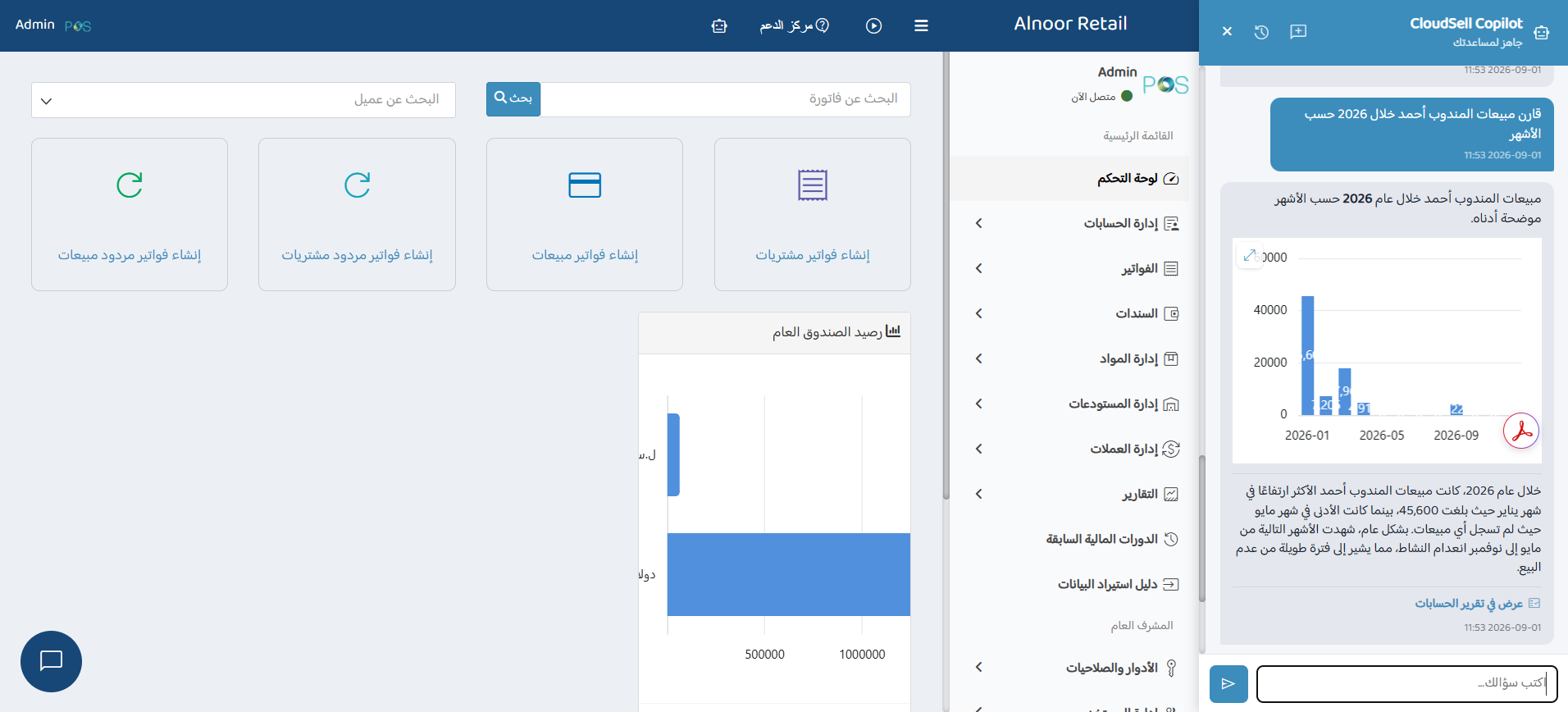
Copilot lives as a persistent panel inside the CloudSellPOS workspace itself — reachable from the dashboard and every module, without breaking the user's flow or requiring a separate login.
What Admins Control & See
- System-wide enable/disable switch from a dedicated settings panel
- Role-based access — Copilot granted only to the functional roles an admin selects
- Per-conversation usage-cost reporting for full spend transparency
- Same tenant branding and RTL Arabic interface as the rest of the workspace
Why This Matters
An AI feature embedded inside business software has to earn its place inside the existing trust model, not sit beside it. Central governance and cost visibility let administrators adopt Copilot with the same confidence they extend to every other module in the system.
07 — Why It's Different
CloudSell Copilot vs. a Generic Chat Assistant
| Generic Chat Assistant | CloudSell Copilot | |
|---|---|---|
| Source of Financial Answers | Generated text, with no live connection to real data | A real query executed against the tenant's own database at the moment of the question |
| Permissions | No concept of access control tied to business data | Respects the user's exact permissions, with zero exceptions |
| General Knowledge | Generic knowledge that may not match the product's actual behavior | Knowledge base built exclusively from CloudSellPOS's real documentation |
| Privacy | Conversation data may be used to train external models | Conversations stay inside the tenant's own database — no third party |
Ready to embed AI into your own product?
Build a Copilot Your Users
Will Actually Trust
Let's design a permission-aware, data-grounded AI assistant tailored to your platform, your data model, and your users' language.
Start Your Project