Finance & HR Automation
From Request to Payment:
Automating Employee Allowances End to End
How one Power Apps solution, a library of Power Automate flows and an RPA robot replaced paper forms, email chasing and days of manual ERP data entry for an entire company.
01 · Overview
At a Glance
- Client
- Confidential – a mid-sized enterprise with office-based, field and remote staff
- Departments
- All employees, line managers, HR, Finance, Accounts Payable and Finance Management
- Scope
- Overtime, per diem (domestic and international), business tickets and certification-exam claims
- Solution
- Canvas app, 19 cloud flows, 1 desktop (RPA) flow, embedded Power BI dashboard, SharePoint and Dataverse data
- Integrations
- Microsoft Entra ID, Teams, Outlook, Approvals, Word Online (PDF generation), Dataverse / CRM cost centres, Dynamics AX 2012 on-premises
- Licensing
- Built to run on the client’s existing Microsoft 365 licences for every employee; premium capability is confined to a small number of back-office automations
02 · The Problem
The Challenge
Every month, employees across the company claimed overtime, travel per diems, business tickets and exam fees. Each claim travelled through a line manager, HR and Finance before it was keyed by hand into Dynamics AX 2012 and finally paid. None of those steps were connected.
- No single source of truth. Requests lived in forms, spreadsheets and inboxes, so nobody could say with confidence where a claim was or who needed to act next.
- Manual calculation. Overtime multipliers and per diem rates differ by employee, by trip type and by destination, and were worked out by hand.
- Days of repetitive ERP entry. Finance re-typed every approved request into AX journal lines, then added closing lines per employee and balanced the journal manually.
- Payment risk. Per diems could be paid for trips that were later cancelled, and overlapping claims for the same dates were hard to spot.
- Constant chasing. Approvals depended on someone remembering to follow up by email.
- Slow reporting. Cost-centre and monthly summaries were assembled manually whenever management asked for them.
Before and After
Before and after
What changed for employees, approvers and the finance team.
Before
- Requests scattered across forms, spreadsheets and inboxes
- Overtime and per diem amounts worked out by hand
- Approvals chased by email, with no view of who is holding a request
- Every approved request re-typed into Dynamics AX, line by line
- Journal closing lines and balancing done manually
- Per diems could be paid for trips that were later cancelled
- Cost-centre and monthly reports assembled on request
After
- One app and one record per request, with a live stage tracker
- Amounts calculated automatically from each employee’s rates
- Approvals in Teams and Outlook, with automatic reminders
- A software robot enters approved requests into the ERP in bulk
- Journal validated automatically before Accounts Payable is notified
- Travel must be confirmed before a per diem can move on
- PDF reports and Power BI analytics available on demand
03 · The Solution
The Solution
We designed and delivered Allowances Management: a single Power Platform solution that owns the whole journey, from the moment an employee opens a request to the moment Finance marks it paid. Employees get a guided form that calculates their entitlement automatically. Approvers act from Teams or email in one click. Finance selects approved requests in bulk and a software robot enters them into the ERP, validates the journal and reports back.
The result is one transparent process that the whole company uses, with every amount, approval, comment, journal number and payment recorded against the request.
Lifecycle
One request, seven controlled stages
-
Pending
Who acts: EmployeeGuided form, automatic amount calculation, date and overlap validation. Manager is resolved automatically.
-
Manager Approved
Who acts: Line managerApproval card in Teams and Outlook with a deep link to the request. Capital-project per diems add a dedicated approver.
-
Travel Confirm
Who acts: EmployeeFor per diems: the traveller confirms the trip was completed or cancelled and can attach a business ticket. Daily reminders on working days.
-
HR Approved
Who acts: HRHR review with comments captured in the request history.
-
Finance Approved
Who acts: Finance ManagerFinal approval. A PDF record and all attachments are filed automatically against the project cost centre in CRM.
-
Waiting Payment
Who acts: FinanceBulk ERP entry by RPA, journal numbers written back, per-employee PDF statements sent to the Finance Manager.
-
Paid
Who acts: FinanceBulk mark as paid; the employee is notified in Teams and by email.
Rejections at any stage require a reason, notify the employee immediately and close the request. Cancelled trips stop the per diem before it reaches payment.
Rejected at any stage: a reason is required, the employee is notified immediately and the request is closed.
Trip cancelled: the per diem stops at Travel Confirm and never reaches payment.
No response: approvers receive a reminder digest every 10 days; travellers are reminded on working days.
04 · Feature Highlights
A smart request experience for employees
- One form, six work types. Overtime, holiday overtime, domestic per diem, international per diem, business ticket and certification exam, with the form reshaping itself for each.
- Automatic compensation. Amounts are calculated from each employee’s personal rates: overtime at 1.5x and holiday overtime at 2x the hourly rate, and per diems by day using short-term, long-term, capital-project or international rates.
- Built-in validation. Per diem duration is derived from the travel dates, overlapping per diems for the same period are blocked, and work dates are checked in real time.
- Linked business tickets. A ticket can be raised straight from its per diem, so related travel cost stays together.
- Live progress tracker. A visual stage bar on every request shows exactly where it is and who holds it.
- Clear guidance. Inline hints, including bilingual English and Arabic warnings, reduce mistakes at the point of entry.
Compensation calculated automatically
Employees enter hours or travel dates. The app applies each employee’s personal rates, maintained by HR.
Overtime
Regular overtime on working days.
Holiday overtime
Work on public holidays.
Domestic per diem
Rate depends on project type: short term, long term or capital project.
International per diem
Days are derived from the travel dates.
Business ticket: actual ticket amount, linked to its per diem.
Certification exam: the claimed exam amount.
Overlap check: two per diems for the same dates cannot be submitted by the same employee.
Approvals
Approvals that move on their own
- Teams and email approvals. Each stage issues an approval to the right person or role, with a deep link that opens the exact request inside the app.
- Automatic manager routing. The line manager is taken from Microsoft Entra ID; no routing tables to maintain.
- Approver comments preserved. Comments are appended to a running notes history on the request, so nothing is lost between stages.
- Safeguards. The workflow reacts only to meaningful changes, ignores requests deleted by their creator and prevents the same stage being approved twice.
- Scheduled reminders. Every 10 days managers receive one digest of everything waiting for them, and each role receives its own pending list. Reminders respect the working week.
HR
HR administration without IT
- Employee rate management. HR maintains each employee’s ID, department, manager, overtime rate, four per diem rates and work mode from a dedicated screen.
- Configurable approver. The capital-projects approver can be changed from the app in seconds.
Finance
A finance workspace built for volume
Bulk actions.
Multi-select requests and, in one step, send them to the ERP, move them to Waiting Payment or mark them Paid.
Powerful filtering.
Filter by cost centre, employee, request type, work type, status, ERP state, paid state, date range and work mode, with removable filter chips and running totals of count and value.
Live automation status.
Finance watches the robot’s progress in the app: Connecting, Processing, Entering Requests, Validating, Completed or Failed. A lock prevents two automation sessions running at once.
Full traceability.
Each request displays its ERP journal batch number and journal voucher number once posted.
One-click PDF reporting.
Export a single request or any filtered set to a branded PDF, with separate templates per request type and calculated totals, delivered by email.
Embedded Power BI dashboard.
Management analytics sit inside the app, with no need to switch tools.
05 · Spotlight
The Robot That Does the Month-End Entry
The client’s ERP, Dynamics AX 2012, runs on-premises and offers no modern API. Rather than leave Finance typing, we built a Power Automate Desktop robot that works the AX client exactly as an accountant would, only faster and without fatigue.
-
Prepare
Cloud flowA cloud flow gathers the selected requests, groups them by employee, adds department numbers, calculates overtime and per diem totals and excludes external employees.
-
Create the journal
RobotThe robot opens Dynamics AX, creates a general journal named for the period and captures the journal batch number.
-
Enter every request
RobotFor each request it enters the correct ledger account for the request type, company, department, project reference, employee number, description and debit amount, and records the voucher number.
-
Close each employee
RobotIt adds the intermediate and bank closing lines for every employee so the journal balances.
-
Validate
RobotIt runs AX validation and reads back total balance, total debit and total credit.
-
Report and write back
Cloud flowThe cloud flow confirms the journal balances and that the debit matches the approved value, emails Accounts Payable the result and writes journal and voucher numbers to every request.
Live automation status shown to Finance in the app
- ConnectingSession starting
- Processing Requests DataStep 1
- Entering Requests To AXSteps 2–4
- Validating RequestsSteps 5–6
- CompletedBatch posted
Designed for failure, not just success. If AX rejects a project reference or employee number, the robot reads the ERP’s error message, logs it with the employee and request, and carries on with the rest of the batch. Finance receives a formatted error report by email. Separate error handlers cover data preparation, the robot run and the write-back, and each updates the status shown in the app.
Impact: two to four working days of manual data entry returned to the finance team every month.
06 · Architecture
Technical Architecture
A canvas app for everyone, a library of cloud flows behind it, and an RPA bridge to the on-premises ERP.
-
People
Five roles- Employee submits and tracks
- Line manager approves team requests
- HR admin approves, manages rates
- Finance bulk processing, payment
- Finance Manager final approval
-
Experience
Where work happens- Power Apps canvas app Request form, filterable request list, finance workspace, employee rate management, stage tracker
- Microsoft Teams and Outlook Approval cards, notifications, deep links into the request
- Power BI Management dashboard embedded in the app
-
Automation
19 cloud flows- Approvals Stage routing, notifications
- Reminders 10-day digests, travel confirmation
- Documents Word templates to PDF reports and statements
- Cost-centre filing PDF and attachments to CRM
- ERP orchestration Prepares data, runs the robot, validates
- Administration List provisioning, rate updates
-
Data
Systems of record- SharePoint lists Requests, employee rates, project references, job queues, app preferences
- Dataverse CRM cost-centre records and their documents
- Microsoft Entra ID Employee directory and manager lookup
-
Legacy ERP
On-premises- Power Automate Desktop robot Journal creation, request entry, account closing, validation, error handling
- Dynamics AX 2012 General journal, vouchers and batch numbers returned to each request
Experience
Data
Process automation
RPA
Documents
Analytics
Integration pattern
Data Model
Data model
SharePoint lists hold the operational data. Queue lists decouple the app from long-running jobs, and Dataverse links approved requests to CRM cost centres.
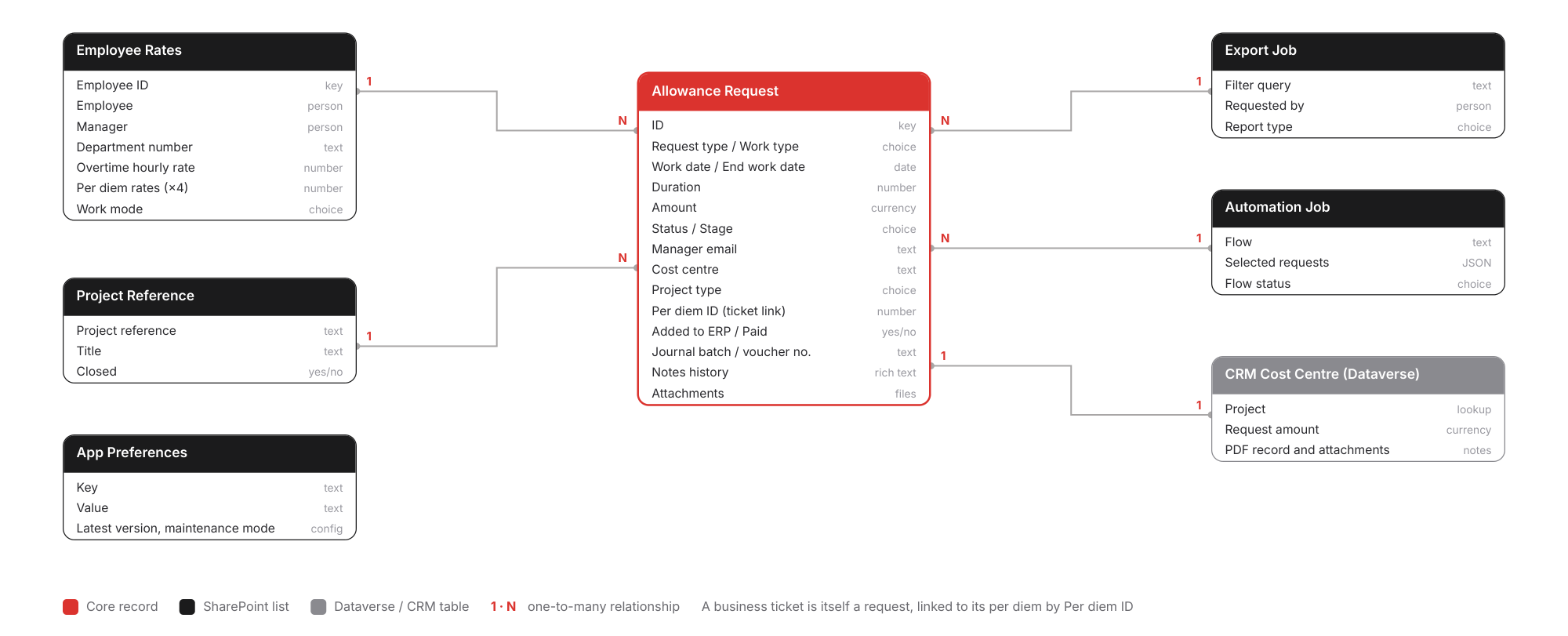
Swipe sideways to see the full diagram, or tap it to open full size.
Operations
Built to be operated, not just delivered
Solution-based ALM.
Everything ships in one solution with 16 environment variables for sites, lists, libraries and role groups, moving cleanly from Development to Production.
Documented deployment.
A deployment checklist travels inside the solution so every release follows the same steps.
Version control for users.
The app checks its version at start-up, can force users onto the latest release and shows a “What’s New” summary after each update.
Maintenance mode.
Administrators can take the app offline for all users with a single setting, with no redeployment.
Self-provisioning.
A setup flow creates the required SharePoint lists and columns automatically, making new environments quick to stand up.
Safe demo experience.
A parallel demo mode with its own data and flows allows training and presentations without touching live records.
Continuous improvement.
The solution has been extended in place since go-live, adding a Finance Approved stage, certification claims, project-type per diem rates and a capital-projects approver.
Governance
Security and governance
- Role-based visibility. Employees see their own requests, managers their team’s, and HR and Finance the stages they own.
- Locked after approval. A request can only be edited by its creator while it is still pending; afterwards it is read-only.
- Complete audit trail. Approvals, comments, rejection reasons, ERP references, automation runs and notifications are all recorded.
- Financial controls. Journal balance and debit-versus-approved-value checks run before Accounts Payable is told a batch is ready.
07 · Results
Business Impact
Company-wide adoption.
More than 85 employees, the entire organisation, submit and track allowances in one place.
Proven at scale.
Over 2,800 requests processed since going live in 2022.
2–4 days saved every month.
Month-end ERP entry is now performed by the robot, freeing Finance for review and analysis.
Accurate by design.
Automatic calculation, overlap checks and journal validation remove the most common sources of error.
Stronger payment control.
Travel confirmation and sequential approvals ensure only valid claims reach payment.
Faster decisions.
Approvals arrive in Teams, reminders are automatic and nobody needs to chase.
Audit-ready.
Every request carries its full history and its ERP journal references.
Instant reporting.
PDF reports and Power BI analytics are available on demand.
Technology
Technology Stack
Still entering approved requests
into your ERP by hand?
We help organisations get more from the Microsoft licences they already own, connecting modern apps to legacy systems without replacing them.